


 Here you will find issues relating to the SMB Market, Running an IT Business, as well as SBS Specifically, The Triad SBS Group, and some handy How To Aricles as well as random thoughts I stumble across.
 -
Windows 8 To Go Gottcha to watch for!
Posted on October 2nd, 2012 No commentsWindows To Go was a new feature introduced in Windows 7, it is really handy way to carry a secure copy of the operating system around with you. You just plug your boot-able thumb drive into a handy computer, reboot it and all your private information a history stays on the thumb drive not on the computer you borrowed. It does take a good sized drive and USB 3 really speeds things up.
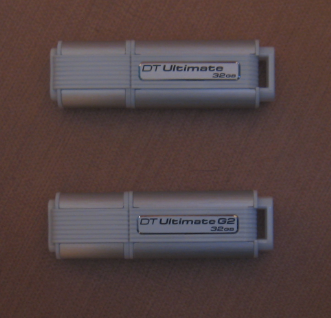
They look alike don’t they? Well after wasting a few hours trying and trying to redo one of my 32Gb Data Travelers that was booting Window 7 just fine (the top one), I broke down and called Kingston. Apparently windows only allows one partition on removable media and Windows 8 To Go requires 2 partitions. So Kingston had to release a new version of the Data Traveler just for Win 8 (the bottom one), I am reasonably sure the other manufacturers will have to do something similar. So do your homework and make sure the drive you are going to buy specifically says it will support Windows 8 Bootable Windows To Go. The trick to knowing on the Data Traveler is the Model Number will start with KW instead of DT, this number is stamped on the metal part of the USB plug, I tried to get a picture but it was impossible to see. So here is what the card looks like that is in the package of the correct model. If you want to look on the metal tounge of the USB plug I recommend bringing a strong magnifing glass to the store with you.
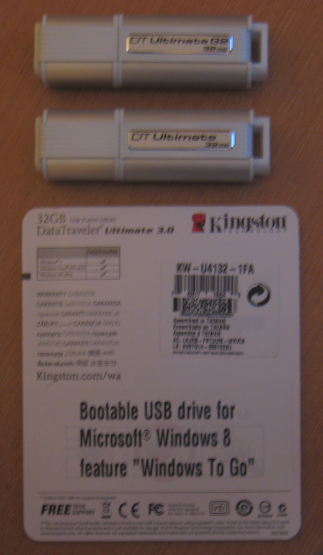
Look for thje KW beginging the model number
Something else you should know the process to create the Windows to go drive has changed as well.
Here is a link to the process for creating both the Windows 7 & Windows 8 versions http://tweaks.com/windows/52279/how-to-create-a-windows-to-go-usb-drive/ -
SBS may have been EOL’d but not HA (yet)
Posted on October 1st, 2012 1 commentJust heard I have been awarded the Microsoft MVP for Small Business Server for the tenth year running. I would like to thank all of you that belong to the SMB Community for helping to make it something I enjoy being part of and supporting so much to enable me to qualify for this award repeatedly! With the announcement of the End Of Life of SBS I was not sure they would keep me around any longer, but apparently the good follks at Microsoft still see some value in my input. I would have have thought they would be tired of me saying “You’re doing what” by now :>)
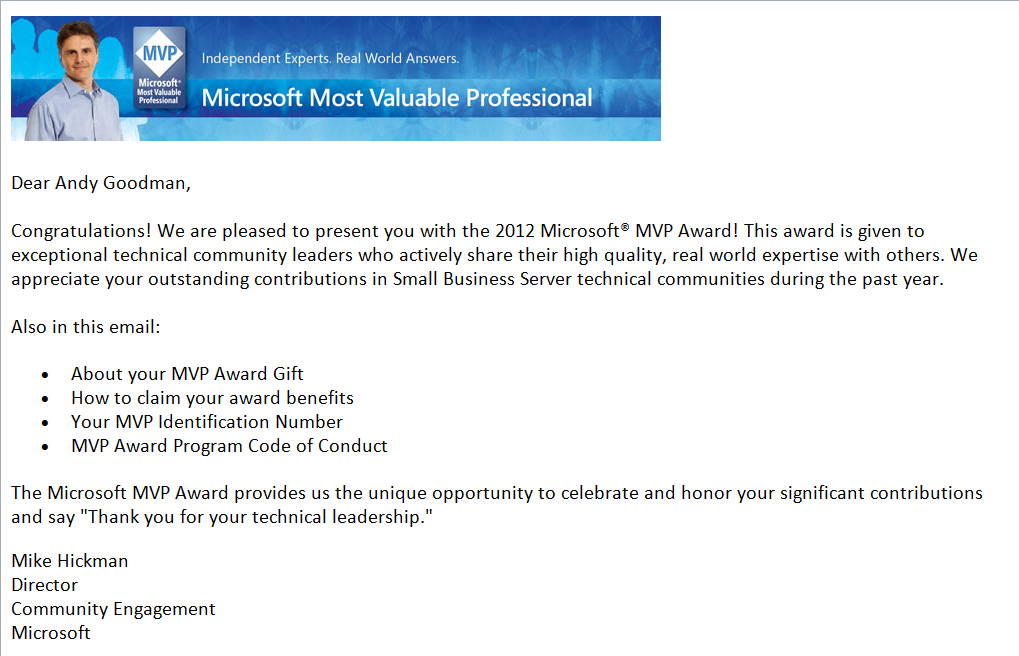
HA renewed for another year!
Thank You All for Your Support through the years,
HA -
Inaugural meeting of the Greater Charlotte Chapter IAMCP
Posted on September 12th, 2012 No commentsCome join us next Tuesday for the inaugural meeting of the Greater Charlotte Chapter IAMCP (International Association of Microsoft Channel Partners). We will launch this group in true form with valuable partner networking and a great presentation on Windows 8 and Windows Server 2012 by Microsoft Sr. IT Pro Evangelist Yung Chou.
Visitors are welcome to join this meeting to learn more groups’ goals and the opportunity to grow with us. Learn more at
Event Details:
Greater Charlotte Chapter of IAMCP Monthly Meeting
Introduction of Windows 8 and Windows Server 2012
Tuesday, September 18th, 6-8:30 EST
Microsoft Multi-Perpose Room (Last door in building on left)
8055 Microsoft Way Charlotte, NC 28273RSVP to mcrall13@gmail.com
Introduction of Windows 8 and Windows Server 2012
The latest release of Windows represents a leap in technologies and Microsoft’s investments on IT’s future. This presentation walks through a few user scenarios on Windows 8 and Windows Server 2012 to get you familiar with some of the new features of the release. Those who attend this session will be able to get productive on the release and evaluate both the client and the server using conventional a mouse-keyboard setting and without a touch-capable device. The following call-to-action is for all IT pros to get a head start:
- Get an evaluation copy of Windows Server 2012 at http://aka.ms/8 and Windows 8 at http://aka.ms/8c
- Register and take the free self-training of Windows Server 2012 track at Microsoft Virtual Academy, http://aka.ms/va
- Download from http://aka.ms/free and read the free ebooks of Windows Server 2012 and Microsoft Virtualization Solutions.
About our presenter:
Yung Chou is currently a Technology Evangelist in Microsoft US Developer and Platform Evangelism team. Within the company, he has had opportunities serving customers in the areas of support account management, technical support, technical sales, and evangelism. Prior to Microsoft, he had established capacities in system programming, application development, consulting services, and IT management. His recent technical focuses have been in virtualization and cloud computing with strong interests in private cloud with service-based deployment, hybrid cloud, and emerging enterprise computing architecture. He is a frequent speaker in Microsoft conferences, roadshow, and TechNet events.
The International Association of Microsoft Channel Partners (IAMCP) is the preeminent networking venue for Microsoft Partners in the world. It brings the best partners together to leverage their joint strengths in delivering world class solutions to their clients while enhancing their ties to Microsoft. Learn more at www.iamcp-us.org or better yet, come join us and experience it for yourself.
Copyright © 2012 Charlotte SMB IT Pro Group, All rights reserved.
All logos and names are the copyrights of the respective owners. -
Like Mark Twain before it the news of the death of SBS has been greatly exaggerated!
Posted on July 9th, 2012 7 comments
What Microsoft actually said was there would not be another version of the on premises version of SBS developed. SBS 2011 is the last one, but it is not dead yet. It will be available for a year through most channels and a year and a half through the oem channel. It will be supported and patched. That is not dead, that is ample notice that there will be no new version, so if you need an on prem suite get busy and deploy it now. This is in sharp contrast to how they handled the death of EBS where they just pulled the plug while the next version was in Beta.
I am not telling you there are not big changes afoot, there are. But you have time to figure out what you want to with your business and what direction you want to take it. There are still going to be clients not in a mad race to the cloud and they are going to need servicing. You have ages in computer time to adjust and learn some new technology so when SBS is really dead you have the skills to still deliver an on prem solution stack, most likely based on some virtualization technology. And yes you are going to have to learn how to install the pieces you want in your stack, daddy is not going to do it for you anymore. Don’t get me wrong I have loved SBS through its entire existence, but this is not the end of the world.
If you were you I would be more concerned with Microsoft’s abandonment of the SMB Channel in favor of its enterprise partners as well as direct delivery of software and services via the cloud. This seems to me to be a bigger threat than the end of SBS which they have been slowly deprecating since its heyday in 2003. This may be just what the User Group or IT Pro Group world required to start a long needed revitalization. Microsoft is not going out of the software business, just changing the rules of how we need to do business with them and opening the door for someone else to step in and lead the SMB Channel that they apparently no longer care about.
We need to figure out how to do business with Microsoft as an adversary instead of a partner, because like it or not they still have the solutions most of our clients want/need. So we must find a way to move forward that is profitable for us and profitable for Microsoft, for if we don’t we will all need to learn to flip burgers and if we do that, we certainly will drive down the value of burger flipping.
So as you can see the sky is not falling, this is just your wake up call to get busy and take the reins of your future and stop letting Microsoft drive your bus, hop up in the seat and take the wheel!
EDIT Actully this webinar is tomorrow not today 7/10/2012 6:00pm PST, (Thx Russ for pointing it out)
BTW I highly recommend you join in the conversation being hosted by my friend Amy Babinchak at http://www.thirdtier.net/2012/07/webinar-future-of-small-business-it/What is this all about, in case you have been sleeping under a rock,
http://blogs.technet.com/b/sbs/archive/2012/07/05/windows-small-business-server-essentials-becomes-windows-server-2012-essentials.aspxAlso checkou this pdf, http://go.microsoft.com/fwlink/?Linkid=257790
-
Can you do us all a favor please?
Posted on June 13th, 2012 2 commentsOur friend Eric Ligman is up for annual review and it would be in all our best interest if you took a minute or two to complete the survey on his performance over the last year.

PLEASE do not confuse his excellent job as messenger with the sometimes lousy or even absurd (death of SBSC comes to mind) messages he has to communicate. He is not the one making the absurd decisions and trashing our channel. He is just the conduit of information from the higher ups at Microsoft. So if you value his ability to clearly communicate the rules and policies of Microsoft and his help demystifying the licensing mumbo jumbo, please take that into account as you evaluate his performance and not the fact you may not like the messages he is forced to deliver.
Eric request to fill in the survey here
http://blogs.msdn.com/b/mssmallbiz/archive/2012/05/16/your-opportunity-to-review-my-performance-because-your-opinion-matters.aspxDirect survey link here
http://ligman.me/JsoXx6Thank You,
HandyAndy -
Amazon lives up to customer service promise
Posted on May 20th, 2012 No commentsUsually you read blog posts of how people are mistreated by vendors, but rarely do you hear when they do good. This morning in preparing for our trip to Mississippi to watch another granddaughter graduate I decided it was time to get a new GPS, mine is so old the updates will no longer fit on it. Anyways I shopped around on the web and as usual Amazon had the best price. So I set about ordering my new Garmin nüvi 2555LMT and when I clicked on the order it button a little pop up appeared saying order it within the next twenty something hours and you will get free one day shipping, so I did. Well when the site checked me out it charged me the 18.98 shipping charge. When I received the email confirmation, I sent a note to Amazon customer service using their contact us email link and within 30 minutes (and on a Sunday yet) I had a response saying they were very sorry and the charge was being removed. I just wanted to take this moment and say Kudos Amazon way to handle customer service! Keep up the good work.
-
TRUSTED IDENTITY Faith in a Technology World
Posted on May 7th, 2012 No commentsJust got this note from Jeff and thought I would share with y’all  An invitation from Jeff Middleton, SBSmigration.com Founder and host of IT Pro Conference 2012.
Our conference is a month away, and last week we announce the blend of 17 MVPs plus 6 respected technology experts who are the speaker for the conference. These are people you likely have met online or heard of, and now you have a chance to spend the weekend in one on one discussions with them. The sessions are now listed here: View Session Outlines and PresentersIn addition to the sessions on the website, we will have breakout presentations by BackupAssist as well as StorageCraft to highlight two of the leading products for backup and disaster recovery. Our own presentation team will provide demo’s and session content on:
- Win8 Server Improved Manageability
- Understanding the VDI Desktop Opportunity
- How Your Secure WiFi and Wireless is Easily Hacked
- The Security Exposure of Using Social Media
Please take a moment, scroll down to see the outstanding speaker list, and what we are offering for Pre-Day content and full conference opportunity. The 2-day conference plus a pre-day deep dive are a great investment in knowing what’s new in technology and growing concerns about privacy and identity protection.
As a reminder, we provide outstanding food, parties, and technical content for the duration…all included in the registration pricing.
Please also take this as a personal invitation from me to you to join us, I would be delighted for you to take part in our great event.
Best regards,
Jeff Middleton
SBSmigration.comFor your quick reference, here’s the speakers line-up this year:
Recognition Name State/Country Security MVP Dana Epp Canada SBS-MVP Susan Bradley CA, US SBS-MVP Amy Babinchak MI, US Security/Technologist Lawrence Teo NC, US Security Trainer Jay Ferron FL, US SBS-MVP Cal McLennan Canada SBS-MVP Jeff Middleton LA, US SBS-MVP Cliff Galiher MT, US Third Tier (Support) Jeremy Anderson CA, US SBS-MVP Marina Roos Netherlands SBS-MVP Dave Nickason NY, US SBS-MVP Kevin Royalty OH, US SBS-MVP Eriq Neale TX, US WHS-MVP Grey Lancaster NC, US Third Tier (Support) Brian Higgins MI, US Exchange MVP Dave Shackelford WA, US SBS-MVP Larry Struckmeyer FL, US SBS-MVP Tero Leskinen Finland IT Pro Expert-MVP Mitch Garvis Canada SBSC Advisory Karl Palachuk CA, US SBS-MVP Jason Miller Canada Security/Legal Ben Yarbrough NC, US IT Pro Expert-MVP Jessica DeVita CA, US SBS-MVP Andy Goodman NC, US Pre-Day Content to keep in mind:We have a Pre-Day by Third Day Brain Explosion (Thursday June 7) which includes: - IPv6 Right Now Presented – by Cliff Galiher
- Active Directory Management Presented – by Brian Higgins
- Exchange 2010 Compliance and Archiving Presented – by David Shackelford
- Managing Data Encryption Presented – by Jeremy Anderson
Our main conference (Fri/Sat June 8-9):
CONFERENCE THEME 2012 TRUSTED IDENTITY: Faith in a Technology World - Who are you and why would I believe it?
- Why should I trust you electronically, ethically, or in reality?
View Session Outlines and Presenters Register Now! Read Jeff’s Welcome Summary Registration: - Attendee 2-Day $495, or 9-Day $595 (plus cruise fare & lodging)
- Guest 2-Day $195, or 9-Day $295 (plus cruise fare & lodging)
June 7-17, 2012 are the events dates for pre-day, weekend conference and cruise. 
-
Please Help Fix A Possible Oversight
Posted on March 25th, 2012 No commentsI am sure by now you are sick of reading the vote for me pleas coming from all your friends. Please take a moment to finish reading this note; it is not one of those requests.
There are about 10 days left for this 2012 SMB 150 Awards competition and it seems some folks who are very deserving are being ignored. I am not asking you to vote for anyone in particular, but please if you feel someone is influential in our space, cast a vote for them. You can vote everyday if you wish and you can vote for as many people every day as you like. But please vote!
It is very easy, go to http://www.smb150.com near the top right you will see a search box, enter the name of the person you would like to vote for and click the little GO button, then click the button right above their name that says Vote. That is all there is to it, please help recognize those folks who are so deserving and yet being ignored.
Think about the folks you look to for advice and make sure they are being recognised, whether it is their job or they are doing it out of passion or both, if they are influencing your actions, your purchases or your ethics please take a few moments and recognise them for their efforts.
The good news is voting ends April 6th, if they do this again hopefully they will make the voting window somewhat shorter next time!
-
Nominations Open for 2nd SMB 150 Awards
Posted on December 19th, 2011 No commentsWell interestingly I heard about this through Karl Palachuk’s newsletter and not from HarryB, you can sign up for Karl’s newsletter at karlp@greatlittlebook.com I highly recommend it to stay current with industry happenings! Here is the note Karl posted in Karl’s SMB Email – Events and News
SMB Nation Announces – Nominations Open for the SMB 150
Got a memo from HarryB at SMB Nation. Once again, they’re working with SMB Technology Network to gather nominations for the SMB 150 list.
You can make nominations right now at http://www.surveymonkey.com/s/W6SXLZ2.
Harry was very clear: You can nominate yourself or anyone else you wish. All you have to do is enter their name, contact info, and a reason for the nomination in that Survey Monkey form.
In early 2012, SMB Nation and SMBTN will generate a ballot with all of the nominees.
I have asked for a complete press release on this, and I’ll post it on my blog when I get it. Stay tuned there.
Thanks to Harry and SMBTN for providing this resource!
-
News Flash from SBSmigration.com
Posted on October 1st, 2011 2 comments
In Las Vegas at opening day of SMB Nation Fall 2011 conference, Jeff Middleton, Founder of SBSmigration.com announced that Andy Goodman (aka: HandyAndy) is joining the business management team with SBSmigration.com. Andy will begin immediately as Partner Program Manager, a new organizational position, with his first order of business being to develop the resources and engagement for the global network of SBSmigration.com channel professionals. Details of the Partner Program will be released later, as the new program will include components such as new products and service options which SBSmigration.com anticipates to be introduced early in 2012.
Andy is currently very much involved in the organization of events for the SMB MVP Community Roadshow, sponsored by HP, Microsoft and SBSmigration.com. Andy’s work in assisting the community in putting together events is an element of the diverse type of work that Andy will bring to the role in organizing both the conventional and unconventional communications channels that define the marketplace that SBSmigration.com spans as a business.